Beta — Join the Early Access

Build AI Workflows
Without Code

Design, connect, and execute sophisticated AI workflows on a beautiful infinite canvas. Drag, drop, connect — and watch your automation come to life.

Join Beta on TestFlight Free during beta · iPad & Mac
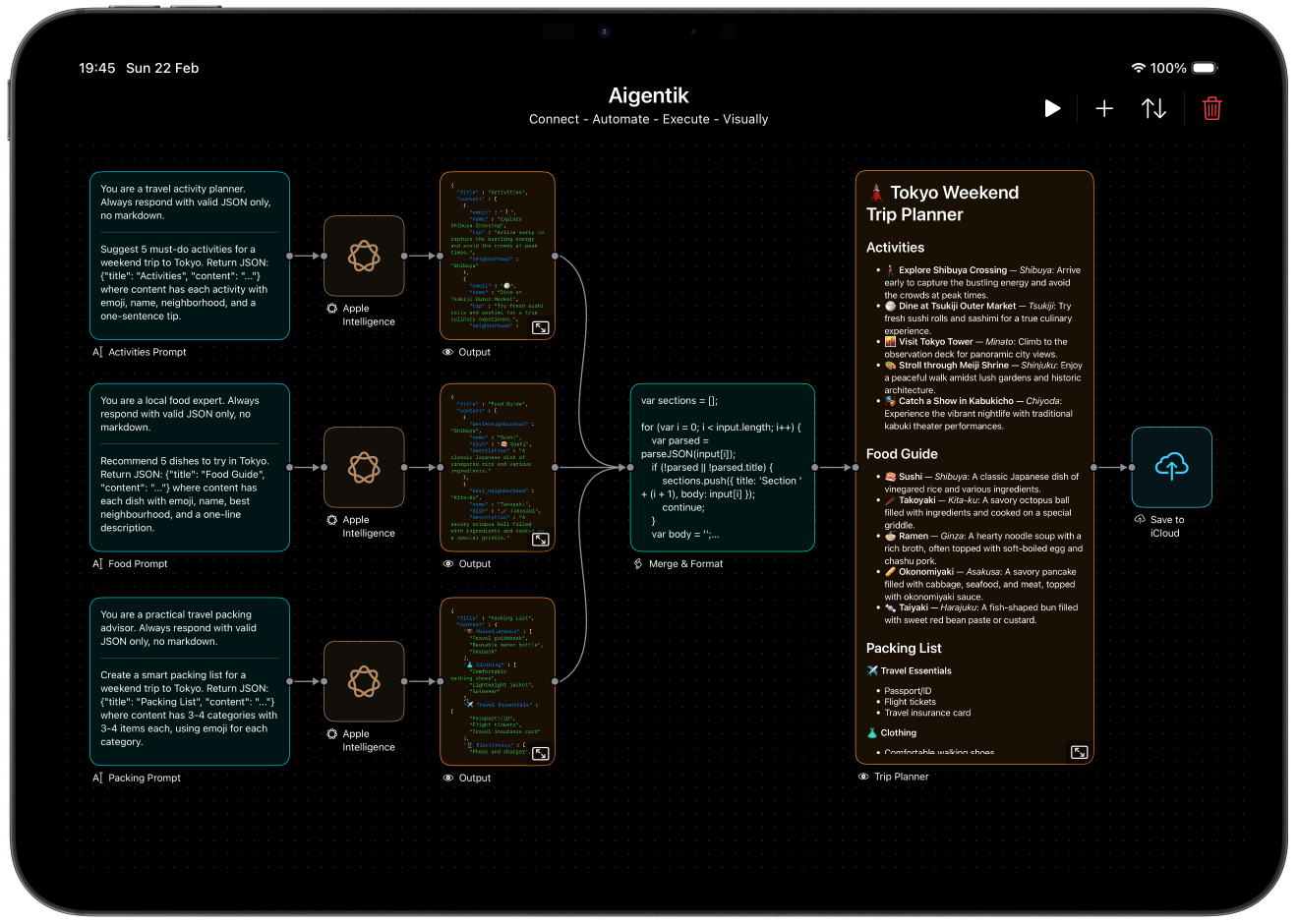
Aigentik workflow on iPad Pro
ConnectAutomateExecuteVisually

Everything you need to
automate with AI

A complete toolkit for building intelligent workflows — from visual design to execution orchestration.

🎨

Design Visually

Forget complex code editors. An intuitive infinite canvas lets you see your entire workflow at a glance. Drag components, draw connections, and organize with precision snapping and haptic feedback.

Infinite CanvasSmart SnappingHaptic FeedbackGrid Background

Execute Intelligently

Dependencies resolve in parallel. Errors trigger fallbacks. Components retry when needed. You design the logic — Aigentik handles the orchestration.

Parallel ExecutionAuto RetryError Fallbacks
🧠

Multiple AI Brains

Connect to Claude, GPT, Gemini, Grok, and 100+ models via OpenRouter. Each AI component is fully configurable — choose your model, adjust creativity, set token limits.

ClaudeGPTGeminiOpenRouter
📈

Trade Smarter

Automate crypto trading with built-in MEXC and HyperLiquid integrations. Configure leverage, set conditions, and let AI-driven signals execute your strategy.

MEXCHyperLiquidLeverage
🔌

Extend Infinitely

JavaScript scripting transforms data any way you need. WebSocket components stream real-time data. MCP integration connects external tools.

JavaScriptWebSocketMCPTriggers
☁️

Save Everything

Every output saves to iCloud automatically. Export entire workflows as portable JSON files. Your automations are yours — backed up, shareable, and always accessible.

iCloud SyncJSON ExportCopy & PasteAuto-save

Multiple AI brains,
one canvas

Connect to every major AI provider. Mix and match models in a single workflow for the best results.

Claude

Anthropic

GPT

OpenAI

Gemini

Google

Grok

xAI

100+ Models

OpenRouter

18 building blocks for any automation

Every component is a self-contained unit with configurable inputs and outputs. Connect them in any combination.

18
Components
100+
AI Models
📥

Input

TextURLFilesPhoto
🧠

AI

ClaudeOpenAIGeminiOpenRouterPrompt
⚙️

Automation

TriggerScriptWebSocketMCPAny
📊

Trading

MEXCHyperLiquid
📤

Output

PreviewiCloud

Built for every workflow

From content creation to algorithmic trading — see how teams use Aigentik to automate what matters.

💼

For Professionals

Automate report generation, content creation, and data analysis pipelines. Connect business data sources to AI and output polished results to cloud storage.

FilesPromptClaudeScriptiCloud
📊

For Traders

Build algorithmic trading bots that react to market signals. Chain AI analysis with trade execution for fully automated strategies with configurable risk management.

WebSocketPromptGeminiMEXC
🎨

For Creators

Generate and process creative content through AI pipelines. Transform text to images, analyze media, and build custom creative workflows.

TextPromptGeminiPreview
🔬

For Researchers

Process data through multiple AI models in parallel. Compare outputs, transform results with scripts, and build reproducible analysis pipelines.

FilesClaude + GPT + GeminiScriptiCloud

Built with precision

iOS 18+
iPad & Mac
5000²
Point Infinite Canvas
100%
Native Swift & SwiftUI
JSON
Portable Workflow Format

Your automation,
beautifully orchestrated

Stop wrestling with code. Start building with Aigentik. Join the beta and be among the first to experience visual AI automation.

Join Beta on TestFlight

Common questions

What API keys do I need?+
Aigentik connects to external services using your own API keys. You'll need keys from the AI providers (Anthropic, OpenAI, Google) or trading platforms (MEXC, HyperLiquid) you want to use. Your keys are stored securely on your device and never sent to our servers.
Is my data secure?+
All API keys and workflow data are stored locally on your device. Aigentik never sends your credentials to our servers. Your workflows and outputs remain entirely under your control.
Can I share workflows?+
Yes! Export any workflow as a JSON file and share it with others. They can import it directly into their Aigentik app. Workflows are portable and self-contained.
Does it work offline?+
The canvas and workflow design work fully offline. However, AI execution and trading require an internet connection to reach external APIs.
Is there a Mac version?+
Yes! Aigentik runs natively on Mac with Apple Silicon via the "Designed for iPad" compatibility, providing a seamless desktop experience.
Is it really free?+
Aigentik is completely free during the beta period with full access to all components and unlimited workflows. AI providers and trading platforms require your own API keys and may have their own costs.